
Resumes and portfolios have changed a lot in the past decade — and so has who, or what, is reading them for job applications.
Between AI screening, applicant tracking systems (ATS), LinkedIn, and portfolio sites, job seekers have more ways than ever to present themselves.
This guide covers what resumes actually look like now, a couple of quick tests to check your own, the mistakes that quietly cost interviews, and where LinkedIn and portfolios fit into the picture.
What Resumes Look Like Now
A few things have become standard on resumes over the last couple of years:
- Clean column layouts (no tables, text boxes, or columns that software might scramble)
- Skills near the top or close to the summary
- Short, specific bullet points with real numbers
- No photo, no objective statement, no “references available upon request”
- Built digitally compatible first, since most resumes aren’t printed out anymore
As for resume format, a summary and skills section up top, followed by a reverse-chronological work history, and education or certifications near the bottom is still the most straightforward choice. This gives both a recruiter and an ATS a quick read on your strengths and a clear, trustworthy work history. To save the format of your resume, export it as a PDF.
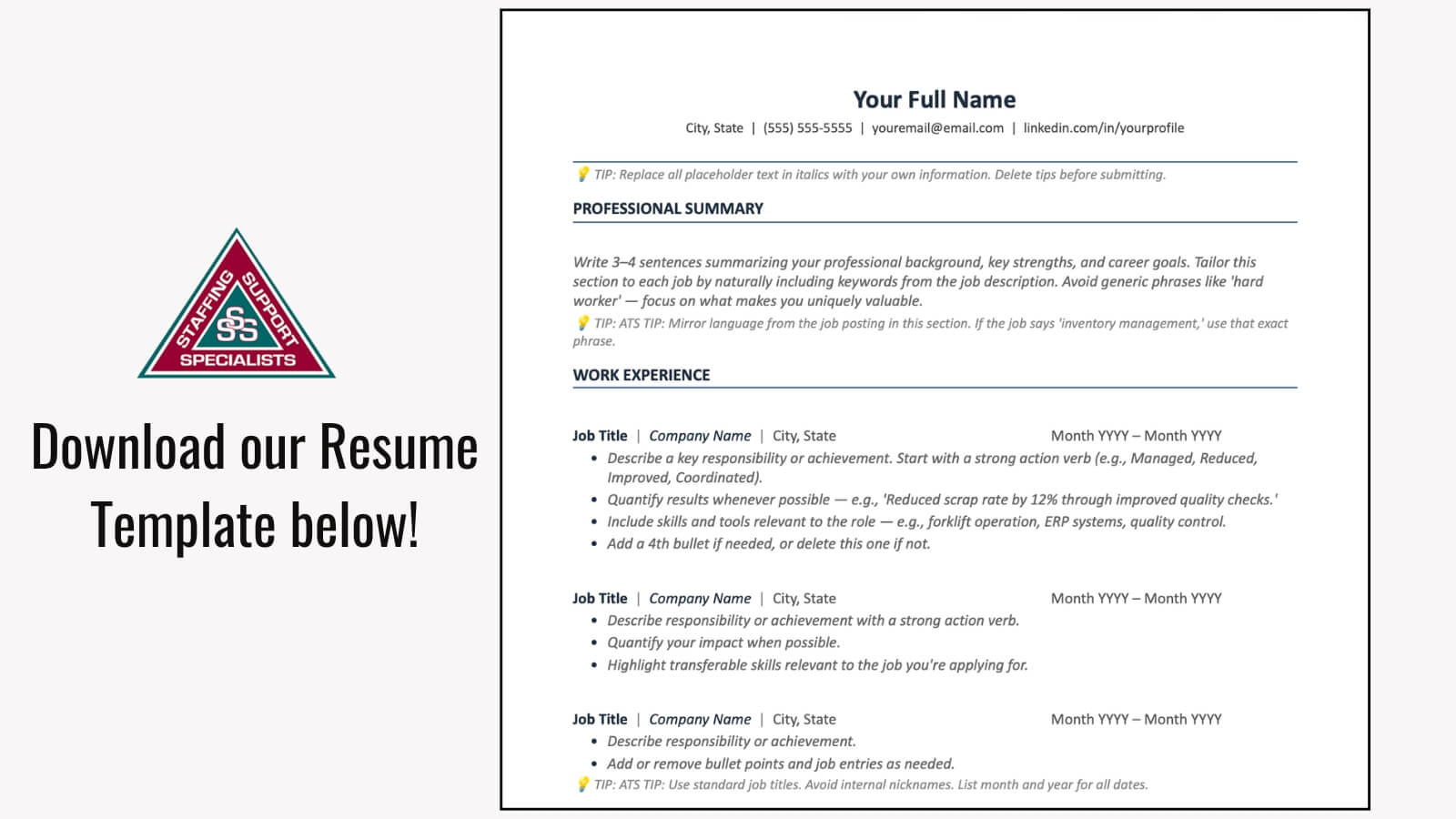
You can download our Resume Template to see this layout in action and use it to create your new resume as well.
Where AI Fits Into the Hiring Process
A resume today is often read by software before it’s read by a person.
- 71% of hiring managers now screen applications using an applicant tracking system (ATS).
- 79% of companies have automated at least part of their hiring process.
- About 1 in 5 employers use AI specifically to screen or rank resumes before a human reviews them.
Now, not every employer uses AI software during hiring, but most still use AI to narrow the pile of applicants before the hiring manager decides who moves forward.
Because of this, your resume has to clear the automated pass, which means clean formatting and language that matches the job posting aren’t optional anymore. If your resume is full of elements, spaces, or extra words, the software might have a hard time deciphering if you actually fit the job.
Common Resume Mistakes & Things to Avoid
Some of these will sound familiar to a seasoned professional. They are familiar because they are still the most common reasons a resume gets passed over:
- Typos and inconsistent formatting — dates, punctuation, and bullet styles that don’t match section to section.
- A generic, one-size-fits-all resume that isn’t adjusted for the job posting’s language.
- Unexplained gaps in work history — a line or two of context goes a long way.
- Resume & LinkedIn that don’t match — different job titles, dates, or employers raise questions.
- Resumes that read as entirely AI-generated — vague, generic language that could belong to anyone.
None of these are disqualifying on their own. But to a recruiter who is working through a stack of resumes, it might flag some of these mistakes and move on.
Also, if you have been out of work for an extended period, this can be a difficult topic for you to discuss on your resume and in interviews. It is normal to feel nervous, but follow our Resume Tips for Standing Out and Navigating Employment Gaps to get comprehensive advice on handling this situation so you feel more confident.
For Marketing, IT & Creative Roles: Let Your Work Speak
For portfolio-driven fields, a resume — no matter how well written — can only say so much. A growing majority of employers now use skills-based hiring, meaning they want to see what you can actually do, not just read a list of past titles. That’s part of why more job seekers in these fields are building something to go alongside their resume:
- Marketing professionals are building simple portfolio sites with a handful of case studies and work examples.
- IT and development professionals are linking to GitHub profiles or a live project instead of describing code in a paragraph.
- Designers and creatives are using personal sites, scrollable platforms, and Canva slide decks to visually showcase their work.
If this interests you, keep it as a supplement, not a replacement for an actual resume. ATS software can’t crawl a personal website, so you still need a clean, keyword-matched, text-based resume for that part.
Once your resume is solid, add your portfolio link somewhere visible, like right under your name header, next to your email and number.
If Applicable, Use LinkedIn as Your Resume
Although we strongly suggest creating your own personalized resume, you can use your LinkedIn profile as an alternative.
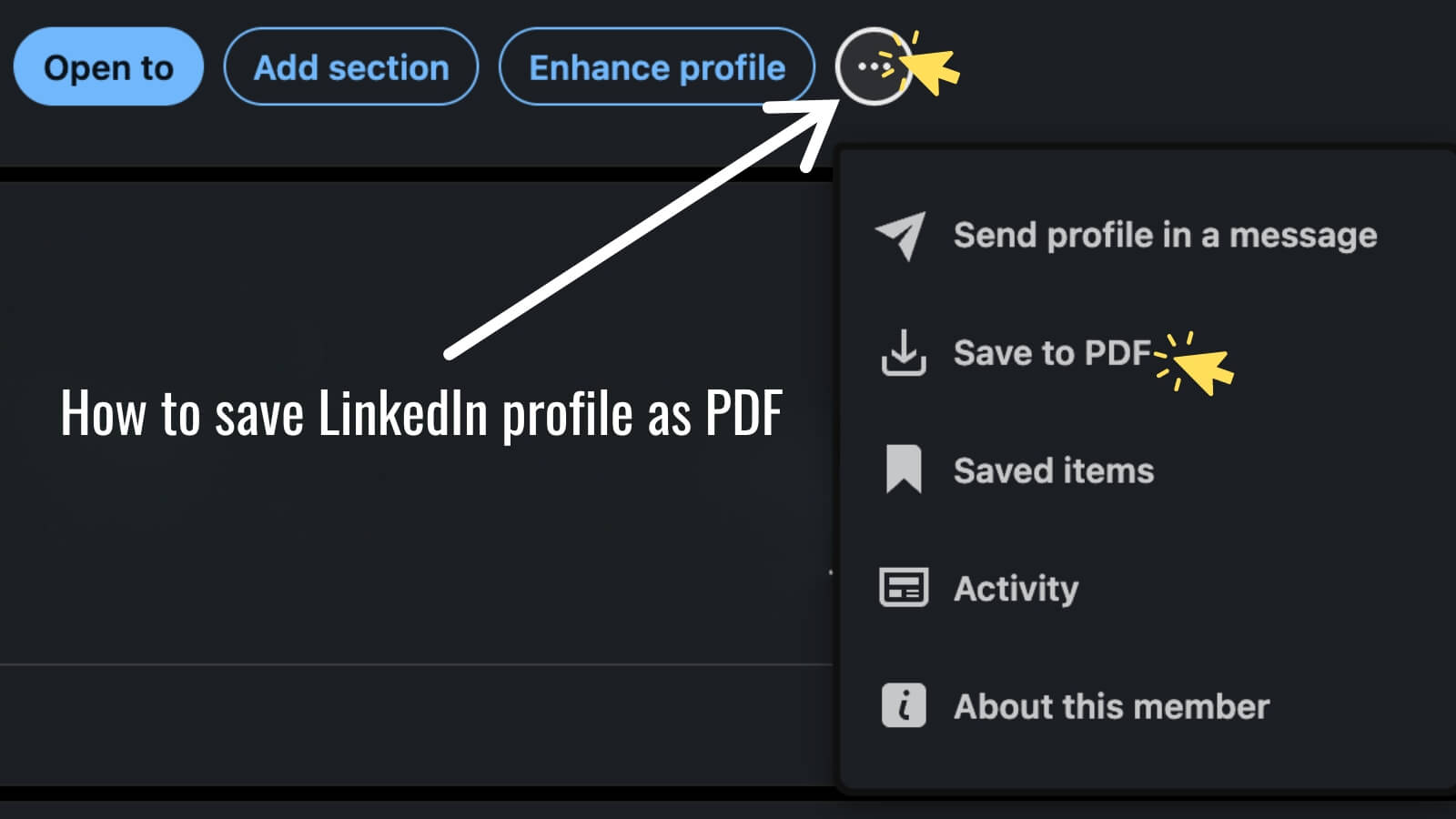
LinkedIn can turn your profile into a downloadable PDF in a couple of clicks:
- From a desktop browser, go to your LinkedIn profile.
- In the introduction section (near your photo and headline), click “More” or the 3 dots.
- Select “Save to PDF”
That’s it. LinkedIn pulls your profile into a formatted PDF you can send or upload to job applications.
This is a useful backup or alternative to a traditional resume but shouldn’t be seen as a replacement for a tailored resume. The auto-generated PDF pulls everything on your profile, isn’t customized to a specific posting, and won’t be keyword-matched to a job description.
Lastly, Don’t Let AI Write Your Resume
After talking about AI, it might be tempting to hand the whole thing to an AI writing tool and call it done. Be careful with that. Most hiring managers can spot an AI-written resume at a glance, usually because the language is generic, the achievements are vague, and every bullet sounds like it could belong to anyone.
AI tools are genuinely useful for editing, tightening wording, or checking that you’ve matched keywords from a job posting. They’re a poor substitute for your own specifics. Use them to sharpen your resume, not to write your story for you.
Get Resume & Job Search Help Through Staffing Support Specialists
Resumes look different than they did even a couple of years ago, but the goal hasn’t changed: make it easy for people to understand who you are and why you fit the job.
Staffing Support Specialists offers resume and career support to job seekers, so you don’t have to go through this alone.
If you’re actively looking for a job in Hartford, Milwaukee, and Southeastern Wisconsin, apply and interview with us today or check out our Career Consulting services.